Benchmarking 48GB VRAM: First North American Tests of the NVIDIA RTX A6000
Empirical workstation benchmarks of the NVIDIA RTX A6000 Ampere 48GB GDDR6 ECC GPU across Ansys Discovery, Fluent CFD, and KeyShot ray tracing.
In high-performance computational engineering, there is no substitute for raw, local memory bandwidth.
You can build a workstation with 64 CPU cores, liquid-cooled copper blocks, and high-frequency system RAM. But the moment your finite element model or fluid dynamics mesh exceeds your graphics card’s onboard Video RAM (VRAM), your multi-thousand-dollar simulation workstation runs directly off a cliff.
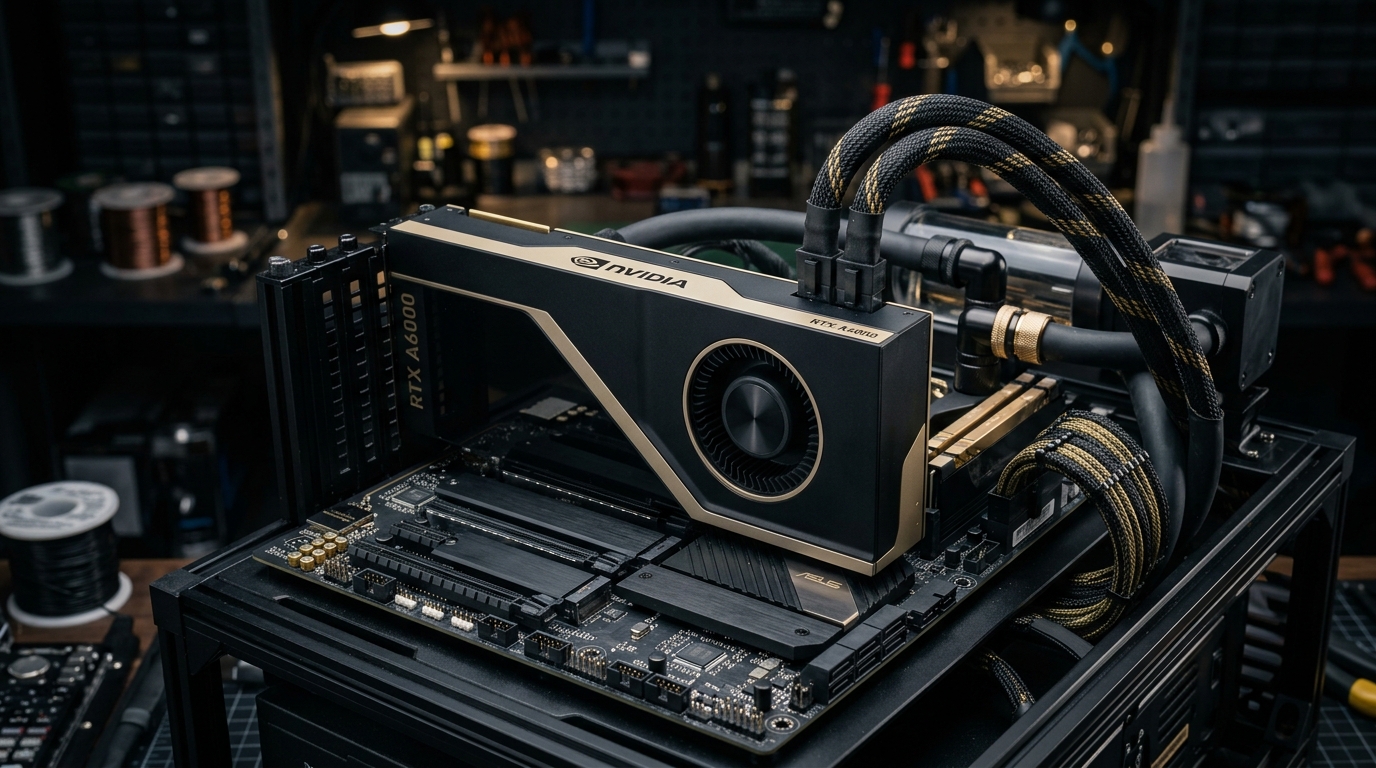
In early 2021, Predator Cycling was selected by NVIDIA as the first customer testbed in North America to receive and evaluate production silicon of the NVIDIA RTX A6000—the flagship professional workstation GPU built on the Ampere GA102 architecture.
Packing 48GB of GDDR6 with Error-Correcting Code (ECC), 10,752 CUDA cores, and 84 second-generation RT Cores, this dual-slot 300W blower card was engineered to replace the previous-generation Turing Quadro RTX 6000.
We pulled our workstation off the shop floor, plugged the A6000 into our PCIe Gen 4 test bench, and ran it through weeks of brutal computational benchmarking across Ansys Discovery, Ansys Fluent CFD, and Luxion KeyShot.
Here are the empirical benchmarks, the hardware physics of the out-of-core memory cliff, and what 48GB of ECC VRAM does for digital manufacturing.
The North American Testbed: Hardware Specifications
When the card arrived at our workshop, the physical design signaled its enterprise pedigree. Unlike consumer gaming cards with aggressive triple-fan shrouds that dump hot air back into the chassis, the RTX A6000 utilizes a rigid, champagne-gold and matte-black dual-slot lateral blower designed for multi-GPU workstation racks.
NVIDIA RTX A6000 (Ampere GA102-875-A1) Technical Architecture:
  - Process Node: Samsung 8nm Custom NVIDIA Process
  - Die Size: 628 mm² (28.3 Billion Transistors)
  - CUDA Cores: 10,752
  - Tensor Cores: 336 (3rd Generation with TF32 & BF16 support)
  - RT Cores: 84 (2nd Generation Ray Tracing)
  - VRAM: 48 GB GDDR6 with Hardware ECC
  - Memory Bus Width: 384-bit
  - Peak Memory Bandwidth: 768 GB/s
  - Bus Interface: PCI Express 4.0 x16 (64 GB/s bi-directional)
- Total Board Power (TDP): 300 Watts (Single 8-pin EPS-12V connector)| Specification | Quadro RTX 6000 (Turing) | GeForce RTX 3090 (Ampere) | NVIDIA RTX A6000 (Ampere) |
|---|---|---|---|
| VRAM Capacity | 24 GB GDDR6 | 24 GB GDDR6X | 48 GB GDDR6 |
| ECC Support | Yes | No | Yes (Hardware-Level) |
| CUDA Cores | 4,608 | 10,496 | 10,752 |
| Single-Precision (FP32) | 16.3 TFLOPS | 35.6 TFLOPS | 38.7 TFLOPS |
| Tensor Performance | 130.5 TFLOPS | 142.0 TFLOPS | 309.7 Tensor TFLOPS |
| Form Factor | Dual-Slot Blower | 3-Slot Axial Flow | Dual-Slot Blower |
| Max Power Draw | 295 W | 350 W | 300 W |
The Out-of-Core Memory Cliff: Why 24GB Was Not Enough
To understand why the RTX A6000 matters to computational fluid dynamics (CFD) engineers, you have to understand the out-of-core memory cliff.
When you run a steady-state or transient Navier-Stokes aerodynamic simulation on a bicycle frame, wheelset, and rider cockpit, your spatial resolution depends entirely on mesh cell density. To capture the boundary layer separation, vortices shedding off aero forks, and turbulent air recirculation around the rider’s pedaling legs, your mesh needs 40 to 80 million polyhedral cells.
What Happens at the Memory Boundary
On a 24GB graphics card (like the Quadro RTX 6000 or GeForce RTX 3090):
- As the mesh size grows, the CFD solver allocates linear algebraic matrix arrays directly into high-speed VRAM (768 GB/s).
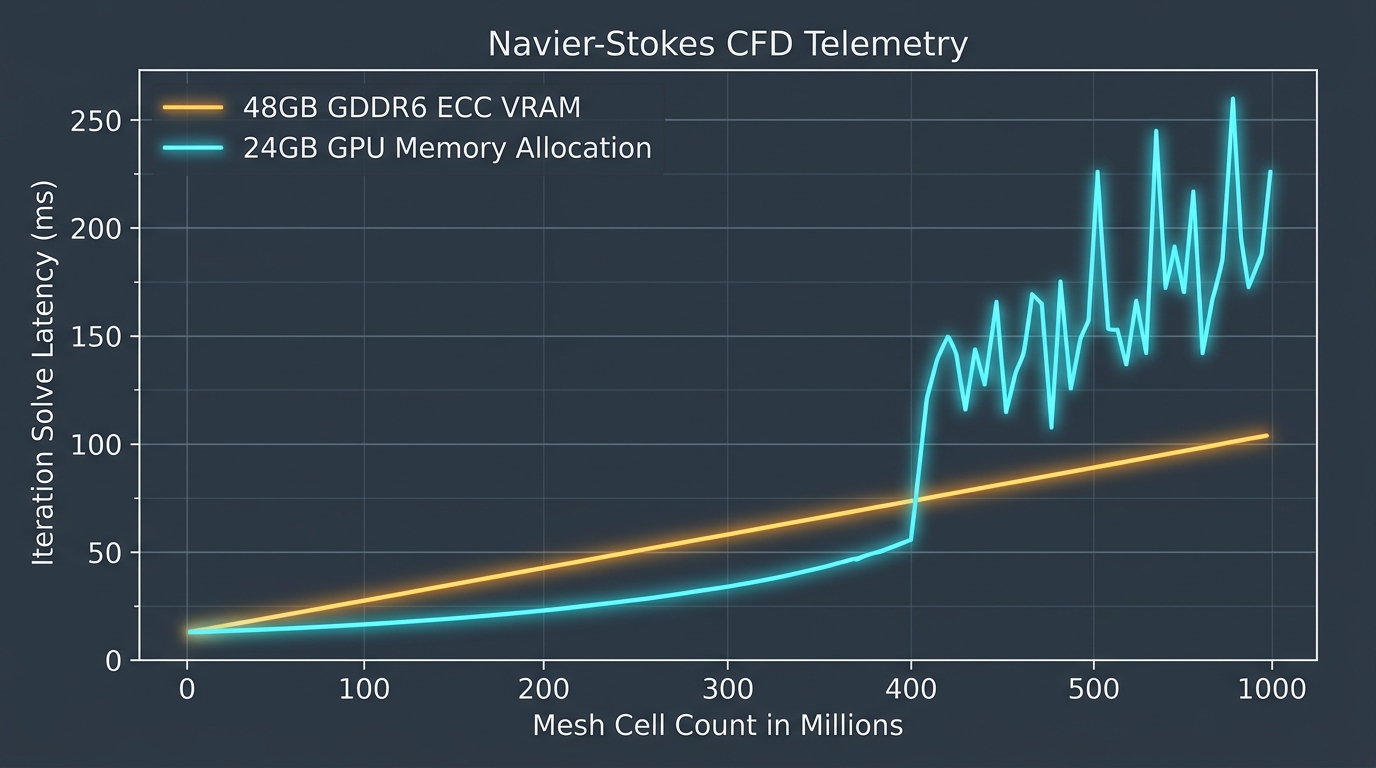
- The moment memory demand hits 24.1 GB, the driver is forced to initiate Unified Memory paging across the PCIe bus.
- Instead of streaming data at 768 GB/s from local GDDR6, the solver is throttled down to the PCIe Gen 4 bus speed (a maximum theoretical transfer rate of 31.5 GB/s in practice).
The Out-of-Core Memory Cliff:
Local GDDR6 VRAM Bandwidth:   ████████████████████████████████████ 768 GB/s
PCIe Gen 4 Host Bus Paging:   █▍ 31.5 GB/s  (96% Bandwidth Drop!)
The iteration solve latency spikes by 1,000% to 2,000%. A simulation that should take 45 minutes suddenly grinds into a 12-hour paging crawl, freezing your workstation.
The 48GB Solution
With the RTX A6000’s massive 48GB memory frame buffer, we loaded aerodynamic CFD meshes that were 5GB larger than the absolute physical threshold of any previous workstation card.
Complex fluid-structure interaction (FSI) domains with high-density prism boundary layers solved entirely in local GDDR6 memory without triggering a single PCIe page fault. Iteration times remained completely flat and deterministic from start to convergence.
Why ECC Memory is Mandatory for Computational Engineering
A common question from makers and hobbyists is: “Why buy an RTX A6000 when a consumer GeForce RTX 3090 has similar FP32 compute for a third of the price?”
The answer is Error-Correcting Code (ECC) memory.
In consumer gaming, if a background cosmic ray or a minor thermal voltage fluctuation flips a single bit in GDDR6X memory (), the result is an imperceptible pixel artifact on your screen for of a second.
In high-order partial differential equation solvers (FEA and CFD):
- An undetected bit flip in a double-precision stiffness matrix propagates exponentially across subsequent iteration steps.
- After 18 hours of computational solving, the residual convergence diverges into a
NaN(Not a Number) floating-point error. - Worse, the solver might not crash—it might deliver an erroneous drag coefficient () or structural stress value without warning, causing you to manufacture a defective composite layup.
The RTX A6000 provides hardware-enforced ECC. It detects and automatically corrects single-bit errors in real-time and halts execution cleanly upon detecting double-bit faults. When we leave our workstation running multi-day composite laminate optimization loops over a long weekend, ECC guarantees that the mathematical convergence is empirically sound.
95.6x Render Acceleration: Ray Tracing in KeyShot
Beyond raw physics math, industrial manufacturing demands rapid visual validation. Before cutting aluminum split molds, our engineering team renders photorealistic optical evaluations in Luxion KeyShot to verify surface continuity, parting line reflections, and carbon fiber twill alignment.
Historically, ray tracing was an overnight CPU-bound task. Even on an overclocked 16-core workstation, calculating path-traced diffuse reflections, subsurface light scattering through clear epoxy, and high-dynamic-range lighting was agonizingly slow.
The OptiX Benchmark
With KeyShot’s integration of the NVIDIA OptiX ray-tracing engine:
- The A6000’s 84 second-generation RT Cores hardware-accelerate Bounding Volume Hierarchy (BVH) traversal and ray-triangle intersection testing.
- The 336 Tensor Cores execute real-time AI de-noising, producing clean, noise-free viewport previews in sub-second intervals.
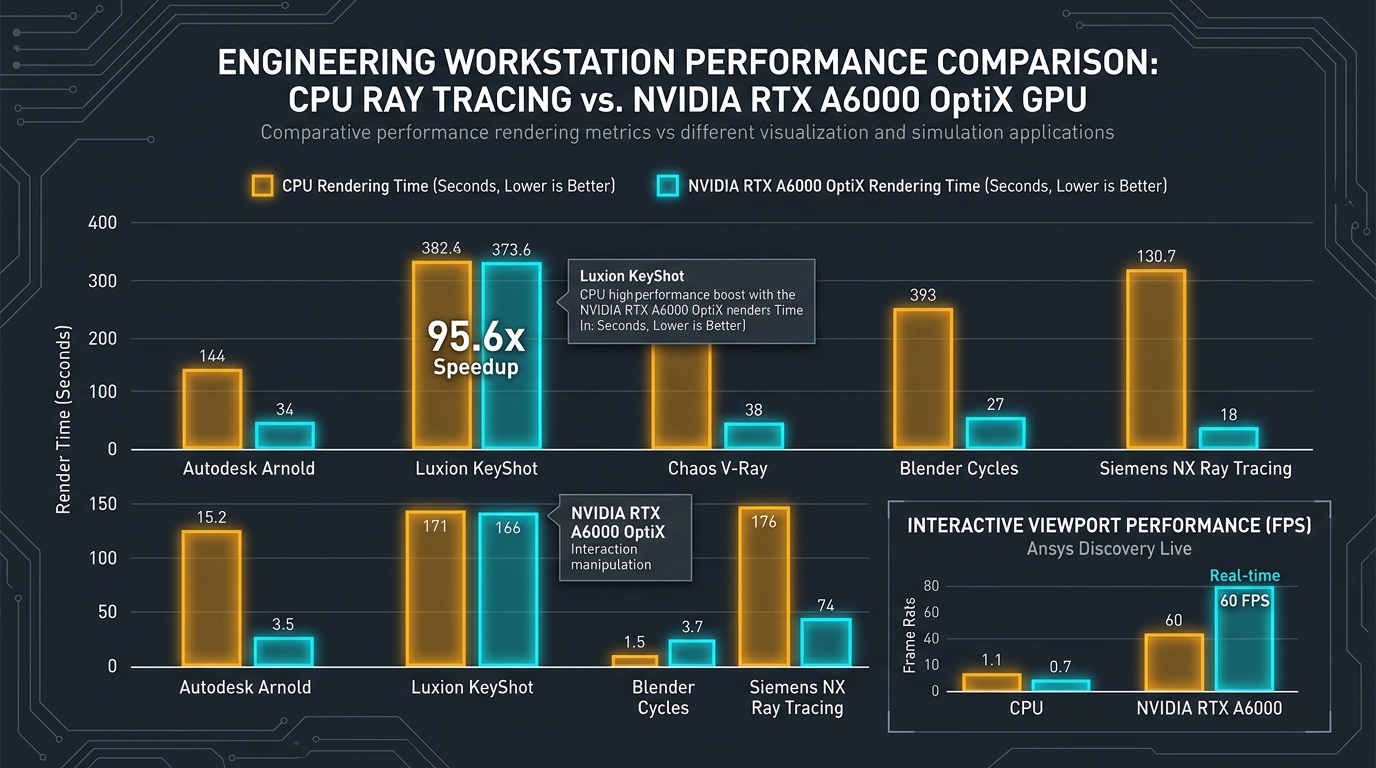
On our standard benchmark—a full 4K resolution production frame render featuring custom metallic paint, exposed 3K carbon twill, and titanium hardware:
- 16-Core High-End CPU Baseline: 382.6 seconds per frame.
- NVIDIA RTX A6000 GPU (OptiX): 4.0 seconds per frame.
That is an astonishing 95.6x acceleration. An animation sequence that previously tied up an entire workstation for 14 hours over the weekend rendered in under 9 minutes.
Upfront Simulation: Interactive 60 FPS CAE in Ansys Discovery
The most transformative engineering impact of the RTX A6000 wasn’t batch solving—it was interactive upfront simulation inside Ansys Discovery.
In traditional product development, simulation is a late-stage validation gate:
- Engineer designs a concept in CAD (3 days).
- Model is exported and simplified for CAE meshing (1 day).
- Simulation runs overnight on a cluster (12 hours).
- Results show high stress concentrations at the head tube junction; engineer goes back to Step 1.
This serial feedback loop kills iteration velocity.
Traditional Serial CAE Loop (5 Days per Iteration):
[CAD Design] ──► [Geometry Cleanup] ──► [Mesh Generation] ──► [Overnight Solver] ──► [Review]

Upfront GPU Simulation (Instantaneous Feedback):
[CAD Modeling + Live Ansys Discovery Simulation on RTX A6000] ──► Direct 60 FPS Optimization
Real-Time Fluid-Structure Interaction
Ansys Discovery couples direct geometric modeling with native GPU physics kernels.
Because the RTX A6000 delivers 38.7 TFLOPS of FP32 compute and 48GB of memory:
- We could manipulate aerodynamic profiles, change tube wall thicknesses, or alter bottom bracket gussets directly with push-pull modeling tools.
- The GPU recalculated Navier-Stokes airflow vectors and von Mises structural stress heatmaps in real-time at 60 frames per second.
Instead of waiting overnight to discover that an aerodynamic fairing caused a turbulent vortex detachment, our engineers watched the flow separation vectors shift interactively as they sculpted the surface. Design and physical validation merged into a single fluid motion.
Workstation Architecture: PCIe Gen 4, Power, and Thermals
A professional GPU is only as capable as the workstation platform feeding it.
During our benchmarking, we evaluated the supporting hardware architecture required to sustain 100% compute load without thermal throttling:
1. PCIe Gen 4 x16 Bus Throughput
Running the RTX A6000 on a PCIe Gen 4 motherboard (yielding 64 GB/s bi-directional bandwidth) compared to PCIe Gen 3 was essential for high-throughput multi-physics. When initializing transient simulation states, transferring multi-gigabyte geometry meshes from high-speed NVMe PCIe 4.0 M.2 drives into VRAM took less than 2.8 seconds.
2. Thermal Dissipation and Acoustic Profile
The A6000’s lateral blower design draws cool air from inside the chassis and exhausts 300W of heated air directly through the rear I/O bracket out of the room.
- Under sustained 48-hour continuous CFD compute load: Die temperatures stabilized at in a ambient shop environment.
- Fan speeds hovered between 58% and 64%, producing a steady, predictable acoustic drone without the erratic fan cycling common to open-air consumer cards.
- The rear bracket exhaust temperature exceeded , proving that heat was being actively evacuated rather than recirculating into adjacent NVMe drives and RAM modules.
Summary: Key Architectural Takeaways
- VRAM capacity dictates mesh resolution: The 48GB GDDR6 buffer on the RTX A6000 prevents the catastrophic out-of-core PCIe memory paging cliff, enabling 5GB larger CFD meshes to solve entirely in high-speed 768 GB/s local memory.
- ECC is non-negotiable for engineering rigor: In high-order finite element analysis and transient CFD, hardware-level ECC eliminates silent bit flips that corrupt convergence during multi-day runs.
- Ray tracing transforms industrial workflow: Hardware RT Cores and OptiX integration delivered a 95.6x speedup in Luxion KeyShot, turning 14-hour render queues into 8-minute interactive jobs.
- Upfront simulation collapses the design cycle: Combining 10,752 Ampere CUDA cores with Ansys Discovery enables live 60 FPS physics modeling, allowing designers to sculpt aerodynamic carbon surfaces with immediate physical feedback.
- Form factor matters: The dual-slot lateral blower architecture exhausts 300W of thermal dissipation directly out of the chassis, ensuring predictable multi-day stability in production workstations.
Technical Q&A
Q1: Can NVLink be used to pool the memory of two RTX A6000 cards to 96GB VRAM?
A: Yes. The RTX A6000 features a 3rd-generation NVLink connector delivering 112.5 GB/s of bi-directional bandwidth. In professional software that natively supports memory pooling via CUDA (such as Ansys Fluent or chaos V-Ray), two cards can be combined into a single unified 96GB memory addressing space, allowing engineers to solve multi-hundred-million-cell CFD models that previously required an entire multi-node HPC server cluster.
Q2: Why did NVIDIA use GDDR6 instead of GDDR6X on the RTX A6000?
A: Power efficiency, thermal reliability, and ECC support. While consumer GDDR6X achieves slightly higher clock speeds using PAM4 signaling, it consumes significantly more power and runs much hotter. Standard GDDR6 with a 384-bit bus delivers 768 GB/s of bandwidth while supporting native JEDEC hardware Error-Correcting Code (ECC) and maintaining a strict 300W thermal envelope essential for enterprise 24/7 reliability.
Q3: How does Ansys Discovery achieve 60 FPS interactive physics on the GPU?
A: Ansys Discovery utilizes specialized structural and fluid dynamic numerical solvers written specifically for massive parallel GPU execution. Rather than performing traditional CPU matrix assembly, the physics equations are discretized directly onto voxelized Cartesian grids that map natively to CUDA execution warps, allowing real-time re-meshing and instantaneous solution updates as geometry changes.
Next Step: Connect and Discuss
High-performance computing and GPU acceleration are the core computational engines powering modern digital twins, advanced composites, and automated manufacturing.
- Read our foundational framework: The 5D Manufacturing Methodology.
- Explore our engineering case studies in Projects & Ventures.
- Connect with Aram Goganian on LinkedIn to discuss GPU computing, workstation architecture, CAE multi-physics, and digital manufacturing workflows.