Design Origin: Fusion 360, AyoWork, and the Industrial Metaverse
How we transformed Autodesk Fusion 360 into a live Design Origin schema, feeding AyoWork edge devices and Omniverse digital twins without version drift.
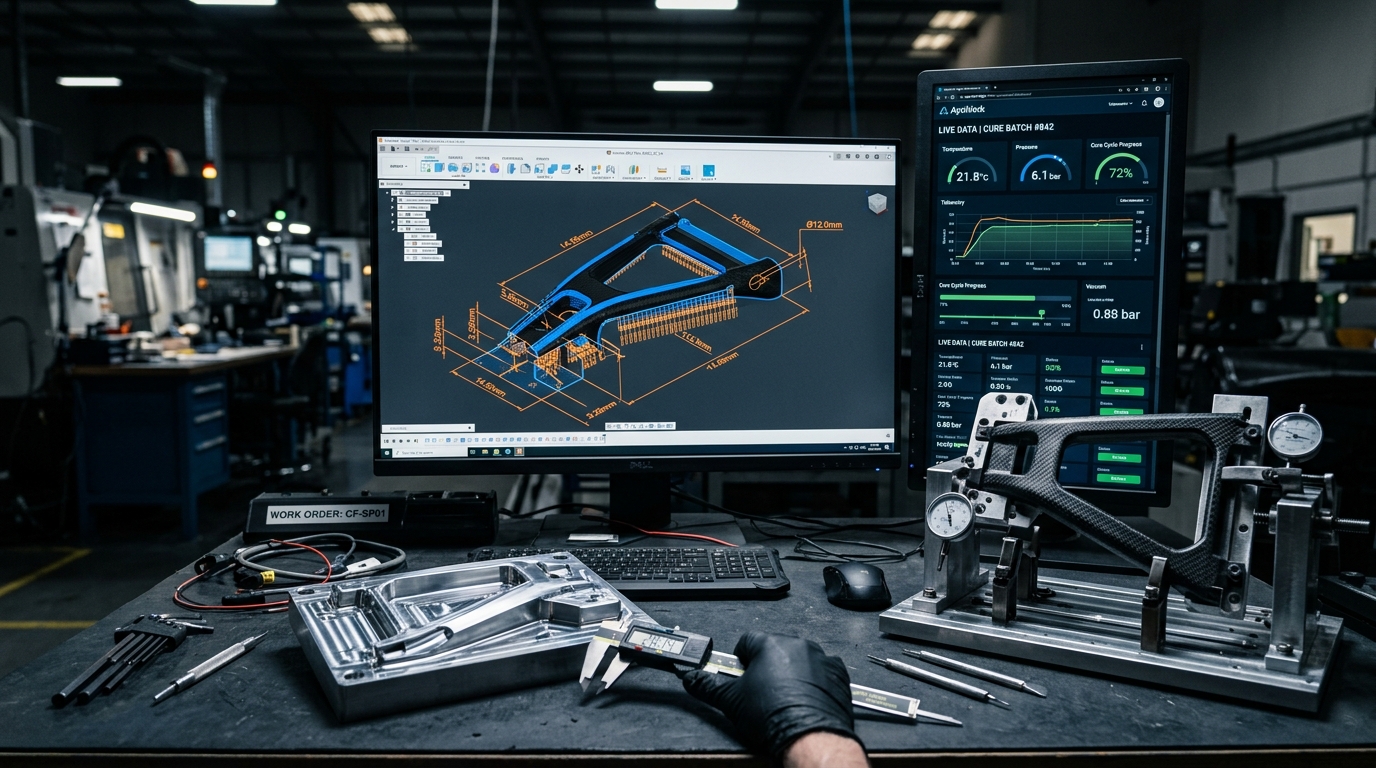
The quiet killer of physical manufacturing is CAD file export entropy.
Here is how hardware engineering typically breaks:
A mechanical designer models a precision carbon composite bicycle dropout in Autodesk Fusion 360. To build it, they export a STEP file and email it to the machine shop. They export a DXF file for the CNC router operator. They export a 2D PDF drawing with Geometric Dimensioning and Tolerancing (GD&T) callouts for the quality inspector. And they take screenshots of the 3D assembly to paste into a Word document for the clean-room composite technician.
Three days later, physical testing reveals a high stress concentration in the chainstay junction.
The engineer opens Fusion 360, changes a fillet radius from to , updates a fastener bore, and saves the file.
What happens on the factory floor?
The machinist cuts the mold using the old STEP file. The clean-room technician lays plies using the old screenshot manual. The quality inspector measures the finished part against the outdated PDF drawing.
Parts fail inspection. Molds are scrapped. Thousands of dollars in 6061-T6 aluminum and Toray pre-preg carbon fiber are hauled to the dumpster.
Why did this happen? Because traditional manufacturing treats CAD models as static electronic drafting drawings that get thrown over an organizational wall.
At Autodesk University 2022, in our presentation “Design Origin: Fusion 360 to Digital Twin and the Manufacturing Metaverse”, we demonstrated how Predator Cycling eliminated file export entropy.
By treating the parametric CAD model as an event-driven semantic database—a Design Origin—we pipe geometric changes, tolerance parameters, and manufacturing metadata directly into our AyoWork industrial operating system and NVIDIA Omniverse digital twins in real time.
The 5D Methodology: Unifying the Data Origin
Under our 5D Methodology (Design, Develop, Data Log, Drive, Deliver), engineering data cannot be fragmented into disconnected file silos. It must flow through an unbroken, bidirectional digital pipeline:
[Phase 1: DESIGN ORIGIN (Fusion 360 CAD)] ──► [Phase 2: DEVELOP (FEA / CFD)]
                   │                                          │
                   ▼                                          ▼
     [AyoWork Orchestration Engine] ◄──────────── [Phase 3: DATA LOG (IoT)]
                   │
         ┌─────────┴─────────┐
         ▼                   ▼
[Phase 4: DRIVE (CAM / QA)] ──► [Phase 5: DELIVER (Verified Part)]
When you define a dimension in CAD, that number is not just a visual representation on a screen. It is an operational contract.
It dictates the toolpath offsets on the CNC mill, the temperature ramp soak times in the autoclave, the allowable variance on the quality inspector’s micrometer, and the physical clearance inside the virtual factory digital twin.
If that operational contract changes, every downstream node must update automatically without human intervention or manual data re-entry.
The Concept of Design Origin: CAD as a Live Schema
A modern parametric CAD model is fundamentally a relational database of mathematical features.
In Autodesk Fusion 360, an aerodynamic monocoque bicycle frame is constructed from:
- Top-down wireframe skeletons: 3D geometric splines defining centerline kinematics.
- T-Splines boundary representations (B-Rep): Continuous curvature () surface bodies.
- Global user parameters: Explicit numerical variables for tube cross-sections, head tube angles, bottom bracket shell tolerances, and mold draft angles.
- Custom metadata properties: Material specifications (e.g., Torayca M46J / T800S pre-preg), cure cycle profile identifiers, fastener torque ratings, and supplier part numbers.
In our architecture, this database is designated as the Design Origin.
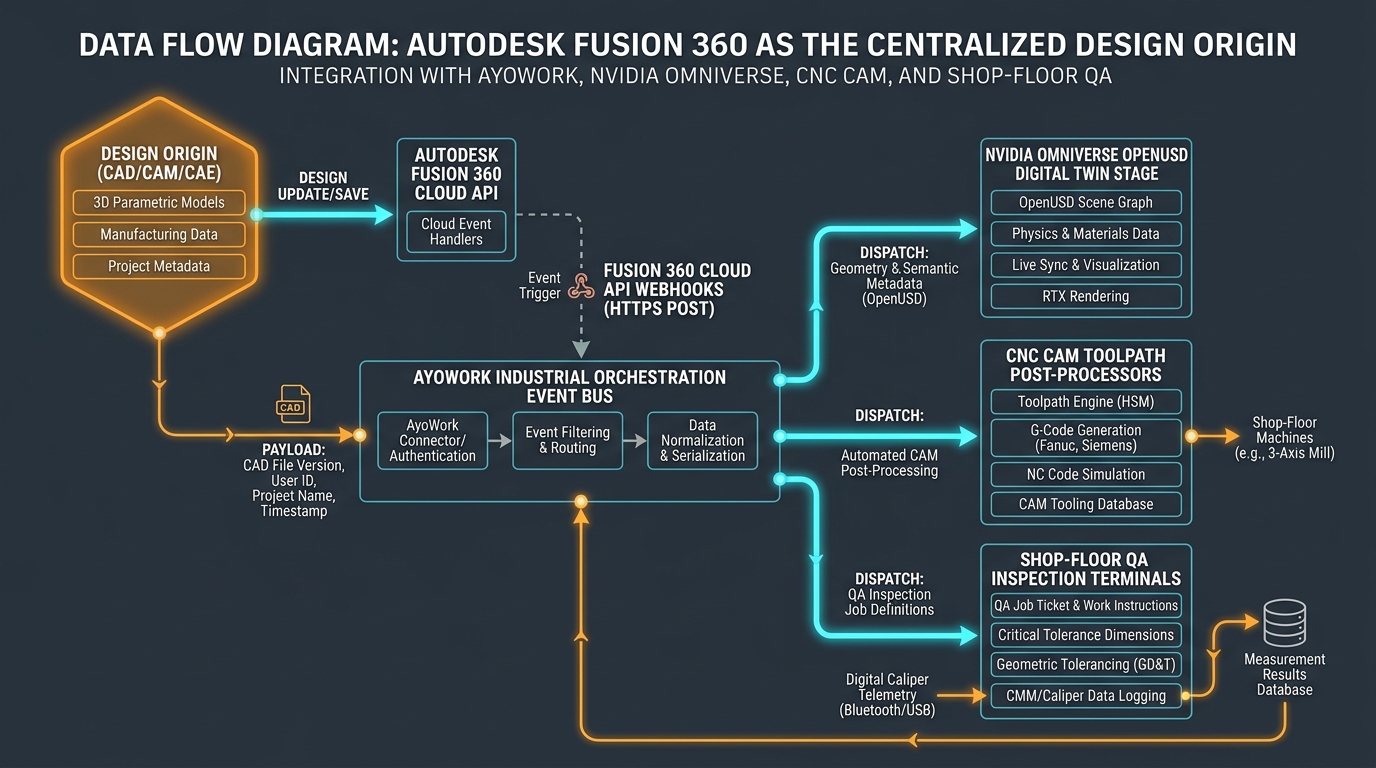
Instead of treating the CAD tool as a drafting desk that produces static drawings, the Design Origin acts as the authoritative single source of truth.
When a design variable changes, the modification generates a structured event payload that updates the entire manufacturing stack.
Event-Driven Webhook Pipeline Architecture
To connect Autodesk Fusion 360 to the factory floor, we tap into Autodesk Platform Services (APS, formerly Forge) webhooks and the Fusion 360 Cloud API.
Whenever an engineer modifies and saves a model, the APS event bus fires an HTTPS POST notification to our AyoWork industrial orchestration engine:
[Fusion 360 Cloud Save] ──► [APS Webhook Trigger] ──► [AyoWork Ingestion Endpoint]
                                                              │
                                                              ▼
                                                   [Schema Parsing Engine]
                                                   • Extract User Parameters
                                                   • Calculate B-Rep Bounding Box
                                                   • Check Semantic Version Tags
Here is an authentic JSON payload schema emitted by our Design Origin integration when a parameter updates:
{
  "event_id": "evt_894f29a0b12",
  "timestamp": "2022-09-27T14:32:05.112Z",
  "source": "autodesk.fusion360.design_origin",
  "model_urn": "urn:adsk.wipprod:fs.file:vf.9kLm0192A",
  "version": 14,
  "release_tag": "PRODUCTION_CANDIDATE",
  "author": "Aram Goganian",
  "component": "dropout_drive_side_v4",
  "parameters": {
    "axle_spacing_mm": {
      "nominal": 142.00,
      "tolerance_upper": 0.10,
      "tolerance_lower": -0.05,
      "critical_inspection": true
    },
    "bb_bore_diameter_mm": {
      "nominal": 46.00,
      "tolerance_upper": 0.025,
      "tolerance_lower": -0.000,
      "critical_inspection": true
    },
    "carbon_wall_thickness_nominal_mm": {
      "nominal": 3.20,
      "tolerance_upper": 0.25,
      "tolerance_lower": -0.15,
      "critical_inspection": false
    }
  },
  "manufacturing_metadata": {
    "material_system": "Toray_T800_250F_Epoxy",
    "cure_recipe_id": "RECIPE_AUTOCLAVE_RAMP_A2",
    "active_cnc_fixture": "FIXTURE_DATRON_M8_04",
    "qa_inspection_level": "LEVEL_3_AEROSPACE"
  }
}
AyoWork ingests this payload, validates its cryptographic signature, normalizes the data, and publishes it across an internal event bus.
Real-Time Downstream Distribution: Omniverse, CAM, and QA
Once the Design Origin event is parsed by AyoWork, it fans out simultaneously across three mission-critical operational targets:
1. NVIDIA Omniverse OpenUSD Stage
The updated surface geometry streams directly into the virtual factory floor via the Omniverse Connector.
The digital twin’s root .usd stage automatically updates the 3D model resting inside the virtual CNC fixture.
If the widened dropout geometry creates a physical interference with the tool changer clearance or robotic vacuum end-effector, the Omniverse PhysX collision engine trips an alarm before physical aluminum is loaded on the mill table.
2. Automated CAM Post-Processing
In traditional shops, an engineer must open a CAM file, re-select modified geometry contours, regenerate toolpaths, and post-process new G-code.
In our integrated pipeline, Fusion 360’s manufacturing workspace uses associative boundary selections linked directly to top-down parametric features.
When the Design Origin updates, the CAM kernel re-evaluates the toolpaths in the cloud, verifies tool-holder collision clearance, and generates updated Fanuc/Siemens G-code files tagged with the new semantic version hash.
The physical CNC mill receives the updated program directly in its local execution queue.
3. Shop-Floor QA Inspection Terminals
The quality control inspector never looks at a paper drawing.
Their touchscreen terminal on the assembly bench connects directly to AyoWork.
The moment a part serial number is scanned, AyoWork renders a dynamic 3D inspection view highlighting the exact critical dimensions and allowable tolerance windows () extracted directly from the Design Origin payload.
Shop-Floor Edge Synchronization: Digital Calipers to Cloud Ledger
The most dangerous link in any quality system is manual data entry.
When an operator measures a bore diameter with a digital caliper and writes on a paper clipboard, errors happen. Numbers get transposed, illegible handwriting is misread, and paper records end up lost in filing cabinets.
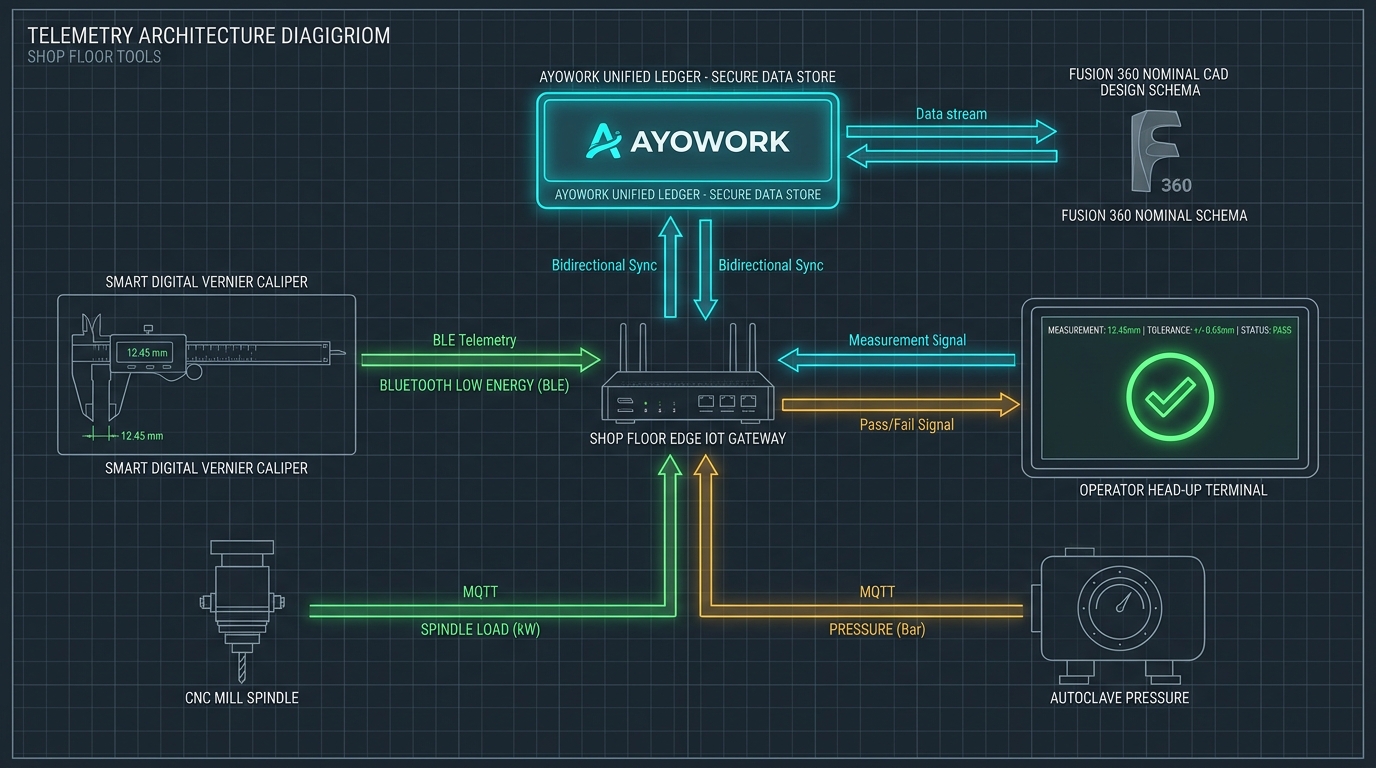
Closing the Physical-to-Digital Feedback Loop
To achieve zero-error quality control, we connected physical inspection tools directly to the AyoWork platform:
- Smart Bluetooth Calipers & Micrometers: Mitutoyo digital calipers equipped with Bluetooth Low Energy (BLE) transmitters pair directly with our shop-floor edge IoT gateways.
- One-Touch Data Capture: The technician positions the caliper jaws across the bottom bracket shell bore and presses the physical data button on the caliper tool.
- Instant Nominal Validation: The edge gateway packages the measurement reading, timestamps it, and posts it to AyoWork over an encrypted WebSocket connection.
- Visual Pass/Fail Heads-Up Display: AyoWork compares the received measurement () against the nominal CAD value () and the allowable tolerance envelope ().
- If in tolerance: The operator’s terminal flashes a large green checkmark.
- If out of tolerance: The terminal flashes red, sounds an alert tone, and immediately locks the part’s serial record, preventing it from proceeding to the paint or assembly stations.
# edge_caliper_validator.py
# Runs on Raspberry Pi / Industrial Edge Gateway
import asyncio
from bleak import BleakClient
import requests

AYOWORK_API_URL = "http://192.168.10.50:8000/api/v1/quality/telemetry"
PART_SERIAL = "CF-2022-0927-04"

def evaluate_measurement(dimension_name, measured_value):
    payload = {
        "serial_number": PART_SERIAL,
        "feature_name": dimension_name,
        "measured_val": measured_value,
        "sensor_type": "BLE_Digital_Caliper_Mitutoyo"
    }

    response = requests.post(AYOWORK_API_URL, json=payload)
    result = response.json()

    if result["status"] == "PASS":
        print(f"[PASS] {dimension_name}: {measured_value} mm (Delta: {result['delta']} mm)")
    else:
        print(f"[FAIL] {dimension_name}: {measured_value} mm EXCEEDS TOLERANCE (+/- {result['tolerance']} mm)")

# Edge loop automatically reads BLE notification packet
Every single measurement is permanently recorded in the AyoWork Unified Ledger, creating an immutable genealogy record for every structural component we build.
Empirical Telemetry: Static Handoffs vs. Design Origin
To quantify the operational impact of replacing static file exports with our live Design Origin pipeline, we benchmarked 12 months of production data at Predator Cycling:
| Operational Metric | Static File Exports (STEP / PDF) | Live Design Origin (Fusion 360 + AyoWork) | Empirical Delta | Manufacturing Impact |
|---|---|---|---|---|
| Engineering Revision Propagation | 4 to 8 hours (Manual re-export & re-CAM) | 14 seconds (Instant webhook & API sync) | -99.7% | Design updates reach CNC queues immediately. |
| Scrap Rate from Out-of-Date Drawings | 6.8% of total production | 0.0% (Zero occurrences) | -100% | Completely eliminated revision mismatch scrap. |
| First-Article Inspection (FAI) Time | 45 minutes / part (Paper drawings) | 6 minutes / part (Automated BLE sync) | -86.7% | Quality inspection is no longer a production bottleneck. |
| Data Entry Transposition Errors | 12 flagged errors / month | 0 errors / month | -100% | Zero human typing between caliper and quality record. |
| Audit Traceability Retrieval | 2 days (Digging through binders) | 0.4 seconds (Single API query) | -99.9% | Instant regulatory and quality compliance reporting. |
The data confirms that the primary source of manufacturing waste is rarely mechanical failure; it is information latency.
When you eliminate the friction of manual file exchanges, your manufacturing agility increases by orders of magnitude.
Architectural Q&A
Q: What happens if the shop-floor internet connection drops?
A: Our shop-floor edge IoT gateways run local SQLite databases and Redis event queues.
If the cloud connection to Autodesk Platform Services drops, all physical machine tools, digital calipers, and inspection terminals continue operating without interruption.
Measurements and CNC cycles are cached locally with microsecond hardware timestamps.
When network connectivity restores, the edge gateway replays the queue into AyoWork, ensuring zero data loss.
Q: How do you prevent an engineer’s work-in-progress draft from accidentally retooling a live CNC mill?
A: We enforce strict Semantic Versioning and State Gating within the AyoWork event router.
When an engineer saves an iterative draft in Fusion 360, the payload carries a DRAFT tag.
Draft payloads update the engineer’s personal sandbox and the Omniverse visual simulation stage for spatial verification, but they are strictly barred from production CAM post-processors or live inspection terminals.
Only when a project lead applies a cryptographic RELEASE_PRODUCTION milestone tag does AyoWork compile the new G-code and push it to active machine queues.
Q: Can this architecture integrate with non-Autodesk CAD tools?
A: Yes. While we built our primary pipeline around Autodesk Fusion 360 due to its cloud-native API and integrated CAM kernel, the AyoWork event bus is CAD-agnostic.
We have deployed identical ingestion connectors for SolidWorks, Rhino 3D, and Siemens NX by utilizing local file-system watchers that parse exported STEP/JSON schemas on save.
Summary: Building the Living Manufacturing Pipeline
The industrial metaverse is not a cartoon virtual reality headset where engineers pretend to hold digital wrenches.
The real industrial metaverse is an interconnected, physics-based, event-driven data fabric that links geometric intent directly to physical machinery.
To eradicate file export entropy in your engineering operations:
- Establish a Single Design Origin: Treat your parametric 3D CAD model as a live database, not a static drawing. Keep all geometric parameters, tolerance bands, and material specs in a unified digital schema.
- Automate Revisions with Cloud Webhooks: Eliminate manual file conversions (STEP, DXF, PDF). Use event-driven APIs to push updates to CAM post-processors and digital twin viewports the second a design is saved.
- Connect Shop-Floor Edge Tools: Equip digital calipers, micrometers, and machine controllers with IoT telemetry. Stream physical measurements directly into a cloud ledger to validate tolerances automatically.
- Unify Operational Data with AyoWork: Maintain a single, immutable record that maps every physical serial number back to the exact CAD commit hash that created it.
When design bits and shop-floor atoms are synchronized in real time, the boundary between engineering concept and physical production vanishes.
You build right the first time. Every single time.