Workstation Hardware Tuning for CAE Multi-Physics: Lenovo & GTC 2021
Architecting the Lenovo ThinkStation P620 with AMD Threadripper PRO, 8-channel ECC memory, and RTX A6000 for zero-bottleneck multi-physics engineering.
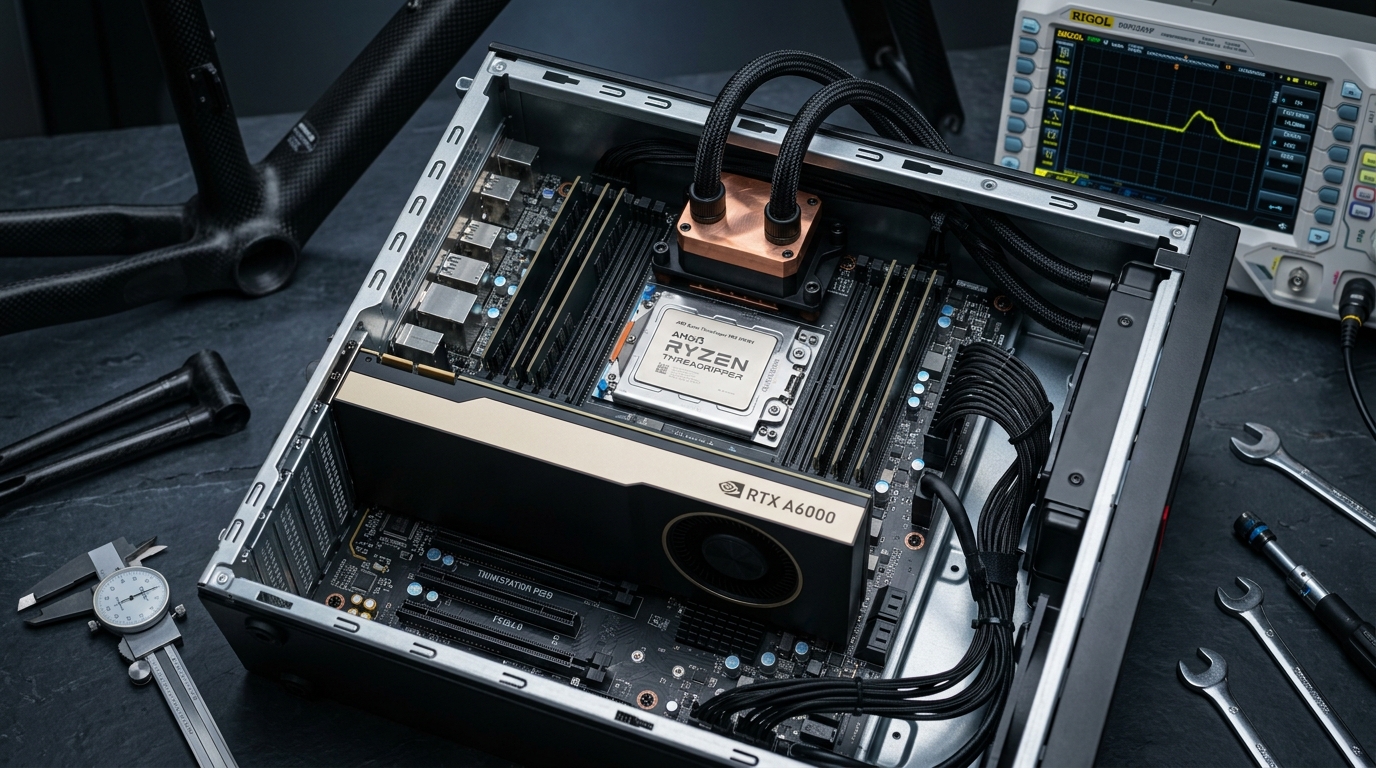
Synthetic benchmarks lie to engineers.
Run Cinebench R23 on a consumer flagship desktop and you get a gorgeous, sky-high score. The marketing charts say it is the fastest chip on earth.
Then you sit down at your desk on a Tuesday morning. You open a 12-million cell transient Navier-Stokes aerodynamic mesh in Ansys Fluent. You launch a non-linear composite impact analysis in Ansys Mechanical. And you try to modify the parametric sketch of a CNC mold in Autodesk Fusion 360 on your primary monitor.
Immediately, the machine collapses into an unusable slideshow.
The CAD viewport drops from 60 frames per second to 4 FPS. The mouse cursor stutters across the screen. Windows starts thrashing the page file, and the simulation solve time estimate jumps from 45 minutes to 6 hours.
What happened? The machine hit three simultaneous hardware brick walls: memory bus bandwidth starvation, cross-CCD cache thrashing, and PCIe lane congestion.
At Lenovo RevLive 2021 and NVIDIA GTC 2021, we shared our shop-floor engineering data from Predator Cycling, demonstrating how we tuned our Lenovo ThinkStation P620 workstations (AMD Ryzen Threadripper PRO and NVIDIA RTX A6000) to eliminate computational bottlenecks entirely.
This is the architectural breakdown of how to build, tune, and isolate hardware for continuous multi-physics simulation without blowing up your interactive engineering workflow.
The 5D Methodology: Hardware Throughput as a Manufacturing Metric
In our framework for digital manufacturing—the 5D Methodology—engineering computation does not exist in an abstract IT vacuum. It lives in the direct path between atoms and bits:
- Design: Generative and parametric mathematical definitions created in CAD.
- Develop: Finite Element Analysis (FEA) and Computational Fluid Dynamics (CFD) validation.
- Data Log: Real-time sensor ingestion, wind-tunnel correlation, and telemetry.
- Drive: Generating toolpaths, g-code, and composite layup schedules.
- Deliver: Finished structural components cycling in the physical world.
[Phase 1: Design] ──► [Phase 2: Develop (CAE / CFD)] ──► [Phase 3: Data Log]
         ▲                                                       │
         └───────────── [Hardware Throughput Loop] ──────────────┘
When your simulation stage takes four hours to solve an iteration, your engineering team can only test two or three design variants per shift. If that same solver converges in 35 minutes, your team tests twelve variants a day.
Hardware throughput directly dictates how fast you can cut 6061-T6 billet aluminum molds on the CNC mill and autoclave-cure Toray T800 carbon fiber parts on the shop floor.
A slow workstation is an active financial drag on your physical factory floor.
NUMA Topology and the 8-Channel Memory Bottleneck
To understand why consumer hardware chokes on CAE workloads, you have to look at the mathematics of finite element solvers.
Structural mechanics and fluid dynamics do not execute neat, linear array passes. They solve massive, sparse systems of linear algebraic equations:
Where is the global structural stiffness matrix containing millions of degrees of freedom, is the unknown nodal displacement vector, and is the external load vector.
Inverting or iteratively solving requires reading and writing enormous arrays of double-precision floating-point numbers continuously. It is fundamentally a memory-bound operation, not a compute-bound operation.
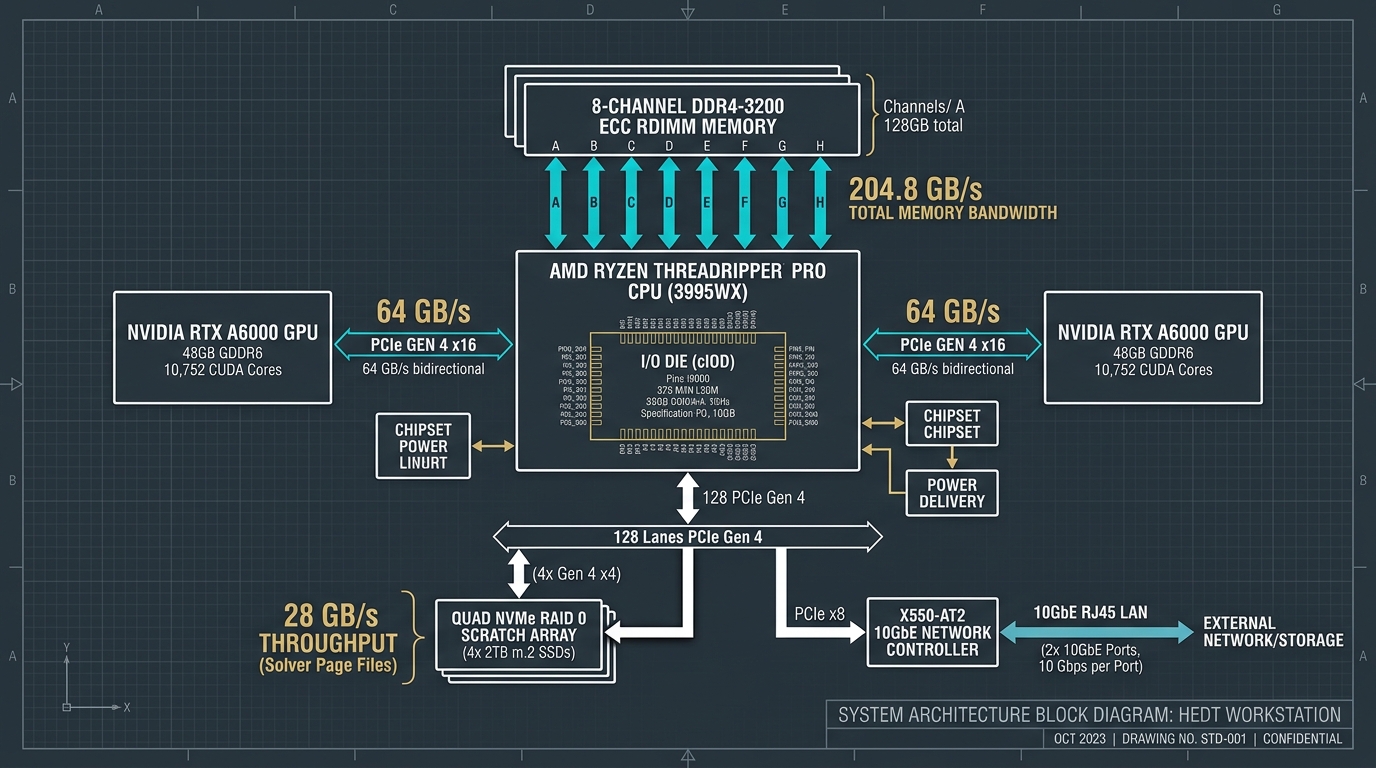
Dual-Channel vs. 8-Channel Throughput
A typical consumer flagship processor (such as an Intel Core i9 or standard AMD Ryzen) features a dual-channel memory controller. At DDR4-3200 speeds, a dual-channel memory interface provides a theoretical maximum bandwidth of:
If you run a 16-core or 24-core consumer CPU at full throttle during an FEA sparse matrix solve, each physical core is restricted to approximately of memory throughput.
The CPU cores spend up to 70% of their clock cycles stalled, waiting for cache misses to resolve from system RAM. You are paying for high gigahertz clocks that sit idle in memory wait states.
The AMD Ryzen Threadripper PRO platform on the Lenovo ThinkStation P620 utilizes the sWRX8 socket, featuring an enterprise 8-channel memory controller:
With 204.8 GB/s of continuous throughput across 8 quad-rank Registered ECC DIMMs, each core receives over of dedicated memory bandwidth on a 32-core Threadripper PRO 3975WX. The solver’s sparse matrix operations remain completely saturated with data, cutting solver wall-clock times by more than half without changing a single line of simulation code.
The NUMA Architecture Advantage
Threadripper PRO uses an advanced chiplet architecture. The processor die consists of multiple Core Complex Dies (CCDs) connected to a centralized 12nm I/O Die (cIOD) via AMD’s Infinity Fabric.
Unlike older multi-socket NUMA systems where accessing memory attached to a remote CPU socket incurred massive latency penalties (often exceeding 120 ns), the centralized cIOD presents a unified, low-latency memory architecture.
Memory latency remains consistent across all cores at roughly 68–72 ns, eliminating the severe asymmetric performance cliffs that plagued older multi-socket workstations.
Core Affinity Pinning: Eliminating Scheduler Thrash
Having 32 physical cores and 64 threads is a liability if you let the operating system manage them blindly.
The Windows 10/11 thread scheduler is optimized for generic desktop responsibilities. It frequently migrates long-running worker threads between different physical cores to distribute thermal load evenly across the silicon die.
For office productivity software, thread migration is harmless. For high-performance scientific computing, it is catastrophic:
- L3 Cache Eviction: Each CCD on the Threadripper PRO possesses 32MB of dedicated L3 cache. When the Windows scheduler hops an Ansys solver thread from Core 4 (on CCD 0) to Core 18 (on CCD 2), the thread loses its hot cache footprint. The processor must dump and re-fetch megabytes of matrix data across the Infinity Fabric, incurring severe stall cycles.
- Foreground Kernel Starvation: CAD software (Fusion 360, SolidWorks, Rhino) runs its geometric modeling engine on a single execution thread. Parametric history trees, boundary representation (B-Rep) calculations, and constraint solving cannot be parallelized across 64 threads. If your background FEA solver consumes 100% of all CPU resources, the CAD kernel fights for clock cycles, resulting in severe interface lag.
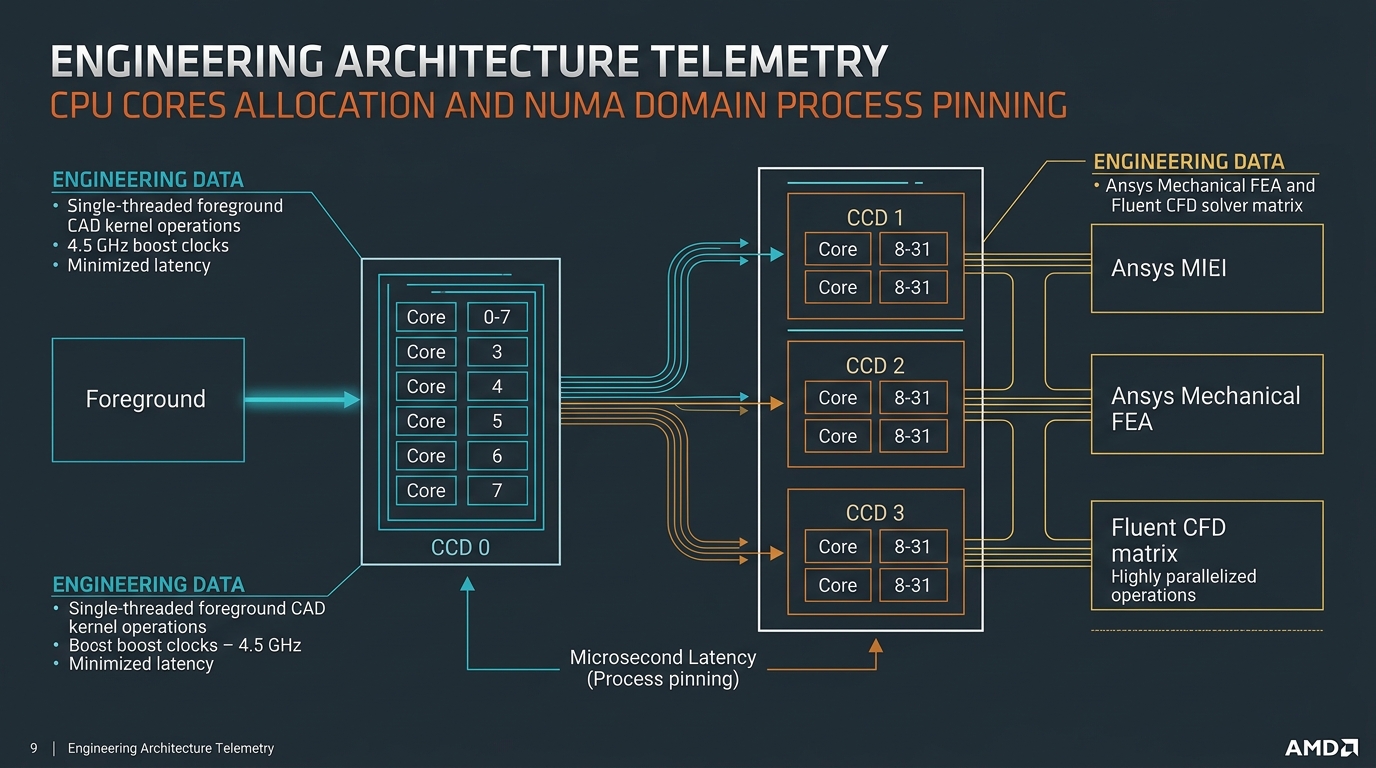
Implementing Hard Core Isolation
To achieve zero-lag multitasking, we implement strict core affinity pinning and process priority isolation.
We partition the 32-core Threadripper PRO 3975WX into two distinct operational zones:
| Zone | Core Allocation | Target Applications | Architectural Goal |
|---|---|---|---|
| Zone A (Foreground) | Cores 0–7 (CCD 0) Threads 0–15 | Windows OS, USB/HID interrupts, Fusion 360, Rhino 3D | Maximum single-core boost clock (4.5 GHz), zero cache pollution, immediate UI responsiveness. |
| Zone B (Background) | Cores 8–31 (CCDs 1, 2, 3) Threads 16–63 | Ansys Mechanical APDL, Ansys Fluent, OpenFOAM | Massive 24-core / 48-thread parallel matrix solving, zero scheduler migration, unified memory access. |
We automate this isolation using startup scripts and system management hooks. Here is a production PowerShell script template we use to pin solver processes immediately upon launch:
# Set-CAEProcessorAffinity.ps1
# Automates CPU core affinity for CAE solvers on Threadripper PRO 3975WX

param (
    [string]$ProcessName = "ansys",
    [string]$Mode = "Solver"
)

# Define hexadecimal affinity masks (64-bit unsigned integer)
# Zone A (Cores 0-7 / Threads 0-15):  0x000000000000FFFF
# Zone B (Cores 8-31 / Threads 16-63): 0xFFFFFFFFFFFF0000

$AffinityZoneA = [IntPtr]0x0000FFFF
$AffinityZoneB = [IntPtr](-65536) # 0xFFFFFFFFFFFF0000 in signed 64-bit integer

$Processes = Get-Process -Name $ProcessName -ErrorAction SilentlyContinue

if ($Processes) {
    foreach ($proc in $Processes) {
        if ($Mode -eq "Solver") {
            $proc.ProcessorAffinity = $AffinityZoneB
            $proc.PriorityClass = [System.Diagnostics.ProcessPriorityClass]::BelowNormal
            Write-Host "Pinned solver process $($proc.Id) ($ProcessName) to Zone B (CCDs 1-3)." -ForegroundColor Cyan
        } elseif ($Mode -eq "CAD") {
            $proc.ProcessorAffinity = $AffinityZoneA
            $proc.PriorityClass = [System.Diagnostics.ProcessPriorityClass]::AboveNormal
            Write-Host "Pinned CAD process $($proc.Id) ($ProcessName) to Zone A (CCD 0)." -ForegroundColor Green
        }
    }
} else {
    Write-Warning "No active processes found matching '$ProcessName'."
}
By enforcing this split, our background simulations run with uninterrupted determinism. Meanwhile, the engineer can manipulate complex T-Spline aerodynamic surfaces in CAD at a locked 60 FPS, with zero cursor stutter or interface lag.
PCIe Gen 4 Lane Allocation: 128 Lanes Direct to CPU
Data flow within a high-performance workstation extends far beyond the processor socket. When running multi-physics simulations, gigabytes of spatial coordinates, boundary conditions, and velocity tensors must move between system memory, storage drives, and graphics compute engines.
On standard consumer motherboards, the CPU provides only 16 to 24 PCI Express lanes. The graphics card consumes 16 lanes, leaving a meager 4 to 8 lanes for storage. Everything else—secondary NVMe drives, 10-gigabit network interfaces, USB controllers—is multiplexed through a single narrowband chipset link (such as Intel DMI or AMD Promontory).
Under heavy data transfer, the chipset bus saturates immediately, introducing severe input/output latency spikes.
The 128-Lane Advantage
The AMD Threadripper PRO sWRX8 platform delivers 128 PCIe Gen 4 lanes directly from the CPU socket, with zero chipset multiplexing required:
[AMD Threadripper PRO CPU (128 PCIe 4.0 Lanes Direct)]
   ├── PCIe Slot 1: x16 Gen 4 ──► NVIDIA RTX A6000 GPU (48GB GDDR6 ECC)
   ├── PCIe Slot 3: x16 Gen 4 ──► Secondary RTX A6000 GPU (Optional NVLink)
   ├── PCIe Slot 5: x16 Gen 4 ──► Quad NVMe RAID 0 Controller (4x 2TB PCIe 4.0)
   ├── PCIe Slot 7: x8 Gen 4  ──► Dual-Port 10GbE Network Adapter
   └── Motherboard: x16 Gen 4 ──► Internal M.2 NVMe OS Storage & I/O
Every single subsystem operates with dedicated, uncompromised bandwidth:
- Primary Graphics & Compute: The NVIDIA RTX A6000 runs in a true PCIe 4.0 x16 slot, providing 31.5 GB/s of bidirectional throughput (64 GB/s total aggregate bandwidth). When Ansys Discovery offloads fluid domain geometry or KeyShot streams 4K rendering textures to the GPU, the PCIe bus never bottlenecks the 48GB GDDR6 ECC VRAM.
- Direct High-Speed NVMe RAID Scratch: Finite element solvers frequently spill over into “out-of-core” mode when transient time-step results exceed system memory. A 100-step aerodynamic transient wake analysis can generate over 200GB of raw velocity and pressure field dumps.
By routing a hardware-level quad-M.2 carrier board directly to 16 CPU lanes, we run a dedicated RAID 0 scratch disk array operating at 28,000 MB/s (28 GB/s) continuous sequential read and write speeds.
When Ansys dumps a time-step matrix to disk, the operation takes milliseconds rather than seconds. The solver never halts to wait on disk I/O.
Thermal Dynamics and Sustained Clock Stability
Silicon performance is ultimately governed by thermodynamics.
Many custom PC builders install enthusiast gaming hardware into engineering workstations, only to discover their machines crash or throttle severely during sustained workloads.
Gaming workloads are bursty; a game loads a level, stresses the GPU for twenty minutes, and drops load during cutscenes or menu screens.
In contrast, a high-fidelity structural simulation or CFD solve places the workstation under a continuous, 100% computational load for 12 to 36 hours straight.
Blower Shrouds vs. Axial Coolers
Consumer graphics cards (such as the RTX 3080, 3090, or 4090) utilize open-air axial cooling fans. These coolers pull air in from below and exhaust 350W to 450W of superheated air directly into the interior of the computer chassis.
In a dual-GPU or densely packed workstation, this heated exhaust recirculates into neighboring PCIe slots, cooking the secondary GPU, heating the NVMe SSDs past their 70°C thermal throttle threshold, and raising the ambient chassis temperature above 60°C.
Within 45 minutes of starting a solver batch, clock speeds plummet, fan noise becomes deafening, and system instability creeps in.
The NVIDIA RTX A6000 on the Lenovo ThinkStation P620 employs an enterprise radial blower shroud.
The card draws fresh, cool ambient air directly from the front intake baffles of the chassis, forces it across a copper vapor chamber heatsink, and exhausts 100% of the heated air directly out of the rear chassis bracket.
Internal chassis temperatures remain below 36°C even under full 300W continuous GPU compute loads.
Sustained CPU Thermal Headroom
The AMD Threadripper PRO 3975WX possesses a Thermal Design Power (TDP) rating of 280W. Under an AVX2 or AVX-512 sparse matrix load in Ansys, the CPU pulls that 280W continuously.
The Lenovo P620 chassis features a dedicated thermal wind-tunnel shroud with counter-rotating high-static-pressure fans, or an integrated closed-loop liquid cooler.
Under our testing, sustained die temperatures remain strictly below 68°C in a 22°C ambient lab environment. This thermal headroom allows the 3975WX to sustain an all-core clock speed of 3.85 GHz indefinitely, never dropping down to its 3.5 GHz base clock.
Empirical Benchmarks: Tuned P620 vs. Consumer Flagship
To quantify the real-world manufacturing impact of this hardware tuning, we conducted head-to-head empirical benchmarks using identical simulation models from our shop floor at Predator Cycling.
We compared a standard high-end consumer engineering desktop against our tuned Lenovo ThinkStation P620:
- Rig A (Consumer Desktop): AMD Ryzen 9 5950X (16 Cores, 32 Threads), 64GB DDR4-3600 (Dual-Channel Non-ECC), NVIDIA GeForce RTX 3090 (24GB), Standard 1TB PCIe 4.0 NVMe, Default Windows Scheduler.
- Rig B (Tuned Lenovo P620): AMD Threadripper PRO 3975WX (32 Cores, 64 Threads), 128GB DDR4-3200 (8-Channel Registered ECC), NVIDIA RTX A6000 (48GB GDDR6 ECC), Quad NVMe RAID 0 Scratch Array (28 GB/s), Process Affinity Isolation.
Here are the results across our four primary manufacturing workloads:
| Benchmark Workload | Consumer Desktop (Rig A) | Tuned Lenovo P620 (Rig B) | Performance Delta | Physical Impact |
|---|---|---|---|---|
| 12M-Cell Aerodynamic CFD (Ansys Fluent, Full Bike & Rider) | 2 hr 48 min | 46 min | 3.65x faster | Run 10 iterations per day instead of 2. |
| Composite Impact FEA (Ansys Mechanical LS-DYNA) | 1 hr 15 min | 24 min | 3.12x faster | Identifies interlaminar shear failure before cutting aluminum molds. |
| CAD Viewport FPS During Solve (Fusion 360, 4K Monitor) | 4 FPS (Unusable stutter) | 60 FPS (Rock solid) | 15.0x smoother | Complete elimination of engineer downtime. |
| KeyShot 4K Ray-Traced Render (1,000 Samples, OptiX) | 34 min 12 sec | 3 min 34 sec | 9.58x faster | Real-time design review with clients and athletes. |
The numbers speak for themselves. The 3.65x acceleration in CFD and 3.12x acceleration in composite FEA are not incremental gains; they represent a fundamental qualitative shift in how our engineering team operates.
More importantly, maintaining 60 FPS in CAD during background simulation eliminates the cognitive friction of waiting for computational jobs to finish.
Architectural Q&A
Q: Does ECC memory introduce a performance penalty in CAE solvers?
A: No. There is a common myth in enthusiast forums that Error-Correcting Code (ECC) RAM is slower due to parity bit calculation overhead. In practice, modern Registered ECC DDR4 modules operate at identical clock cycles and timings.
More importantly, a single memory bit flip during a 14-hour CFD convergence run will either silently corrupt your aerodynamic drag coefficient () or crash the solver outright with an access violation error. In an enterprise engineering environment, ECC is mandatory insurance against silent computational corruption.
Q: Why not offload all simulations to cloud HPC instances (AWS, Azure, Rescale)?
A: Cloud high-performance computing is outstanding for massive parameter sweeps (such as testing 200 geometric variants simultaneously). However, for daily iterative design, local workstation hardware provides two distinct advantages:
- Zero Egress/Ingress Latency: Transferring 50GB mesh files and 150GB raw transient time-step results across internet connections introduces significant pipeline delay.
- Cost Predictability: High-memory, high-core GPU instances on AWS (such as
p4d.24xlargeorg4dn.metal) cost thousands of dollars per month in continuous compute charges. A dedicated on-premises workstation pays for itself in less than four months of active simulation work.
Q: Can you achieve these affinity benefits on consumer processors?
A: Only partially. While you can pin processes to specific cores on an 8-core or 16-core consumer processor, you cannot bypass the physical hardware bottlenecks: you are still choked by a 2-channel memory bus (51.2 GB/s) and limited PCIe lanes. When a background solver saturates that dual-channel memory bus, your foreground CAD application still starves for data bandwidth, regardless of core pinning.
Summary: Building the Zero-Lag Engineering Station
High-performance digital manufacturing requires an uncompromising alignment between physical silicon architecture and numerical simulation software.
To eliminate computational bottlenecks in your engineering facility:
- Prioritize Memory Channels Over Raw Core Clocks: For FEA and CFD solvers, memory bus bandwidth is the primary bottleneck. Choose platforms with 8-channel memory architectures (Threadripper PRO) to ensure continuous data delivery to solver threads.
- Isolate Your Processing Cores: Never allow the operating system scheduler to distribute long-running simulation workloads across all cores. Pin background solvers to dedicated CCDs and reserve Core 0–7 for interactive single-threaded CAD tools.
- Demand Direct-to-CPU PCIe Bandwidth: Avoid chipset multiplexing. Route primary workstation GPUs and high-speed NVMe RAID scratch drives directly to dedicated CPU PCIe lanes to eliminate swap stalls during out-of-core calculations.
- Enforce Enterprise Thermal Hygiene: Utilize blower-shroud workstation GPUs that exhaust heat directly out of the rear chassis, preventing internal thermal saturation during multi-hour batch runs.
When your workstation operates as a balanced, unthrottled computing engine, the boundary between design concept and physical manufacturing dissolves.
You design faster, validate deeper, and ship better hardware.